Answer the question. Be ready for the next two.
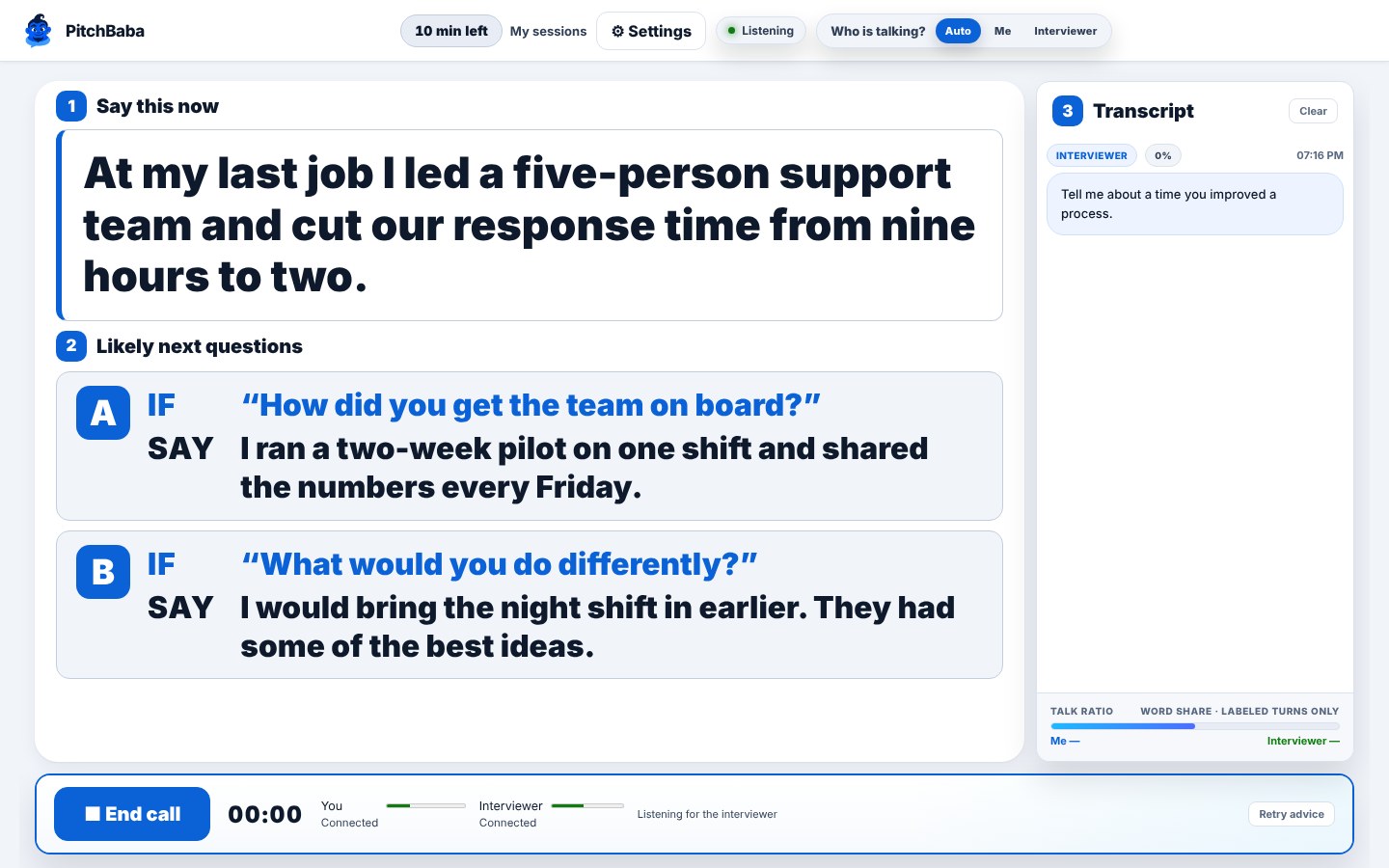
Use it during your real interview. Interview Coach listens in Chrome and shows your answer in very large letters. Under it: the two follow-up questions most likely to come next, each with its answer.
Start free10 free minutes. Pay per minute. No subscription. Selling? See Sales Coach
You need a computer, or a second phone or tablet, running SilentCloser next to the phone or laptop the interview is on. Interview on your computer? Then the computer is all you need.
Try it now. No account needed.
Type a question an interviewer might ask. See what the coach would put on your screen.
Ready for every interview stage
Tell it which conversation you are walking into.
Works in Chrome. Nothing to install. Sign in with email and password.
How it works in four steps
1. Paste the job
Paste the job link, or paste the job description itself.
2. Pick the stage
From the recruiter screen to the offer and salary talk.
3. Paste your résumé
Answers use only what is in it.
4. Start
It listens during the interview and shows your answer, with the next two follow-ups ready.
Three things, big and bold.
- ANSWERYour answer to the question you were just asked, in very large letters.
- STEP 2 · AThe follow-up question most likely to come next, with its answer already written.
- STEP 2 · BThe second likely follow-up, also with its answer.
Practice with an AI interviewer
An AI interviewer asks questions out loud for the job and the stage you picked. You answer, the way you will in the real interview.
It never invents experience.
Answers use only what is in your résumé. Where your résumé has nothing, Interview Coach shows a slot like [your example] instead of making experience up. You fill it with something true.
Start freeANSWER
Yes. The closest thing I have done is [your example].
Nothing in your résumé to draw on? You get a slot, not a made-up story.
After every interview, see exactly how you did.
When the interview ends, your coach writes feedback on it and saves it under Coach feedback, next to the full transcript. You type nothing.
You gave clear answers and tied your experience to the role.
Do better next time
You said: “Um, I guess I just try to stay organized.”
Better: I rank work by customer impact and deadline, then confirm the order with my manager.
What went well
- You answered the first question directly.
- You used a real example with a result.
Thank-you note, ready to copy
Subject: Thank you for today Thank you for taking the time to talk about the role. I enjoyed hearing how the team works, and I’m glad to send anything else you need.
Every session’s feedback has:
- How it went, in one sentence
- The outcome and what was agreed
- What went well: up to three points
- What to do better: up to three moments, each with a better line you could have said
- Next steps for you
- A ready thank-you note to the interviewer, with a Copy button
It also shows how much of the talking you did and how many questions you asked. Only you can see your calls. Download any of them, or delete them, at any time.
Your answers, on top of the call.
The free Chrome extension shows your answer in a see-through panel over your Google Meet or Zoom call, so your eyes stay on the other person.
Minute packs. No subscription.
New accounts start with 10 free minutes. Minutes work for both sales calls and interviews and never expire.
Payments by Square.
Try it before your next interview.
Paste the job, pick the stage, paste your résumé and start.